
Deliver Seamlessly
Wide range of commissioning tools, designed for techs. Technical tools are developed to simplify patching, addressing, and commissioning pixel projects.


Fixtures


Hardware
Professional Lighting Control Platform
Seamless LED control for unforgettable experiences. Drag-and-drop pixel mapping, timeline editing, and real-time control of any installation — built by lighting techs, for lighting techs.
Propose · Deliver · Create
Ever wanted a software package that easily does it all? Communicate effectively, deliver seamlessly and create freely. Learn how LED CTRL changes the game.
Wide range of commissioning tools, designed for techs. Technical tools are developed to simplify patching, addressing, and commissioning pixel projects.
Bring your ideas to life and craft engaging lighting effects. Use intuitive tools like timeline editors, effect generators, and colour pickers to create freely.
Proven uptime in live events and permanent installations.
From single fixtures to stadium-size setups — LED CTRL grows with you.
Comprehensive documentation, tutorials, and expert support when you need it.
Runs seamlessly on Windows and macOS with identical feature sets.
Interactive Tour
Hover or tap any marker on the LED CTRL workspace to explore the tools that power your installation — from pixel mapping to media effects.
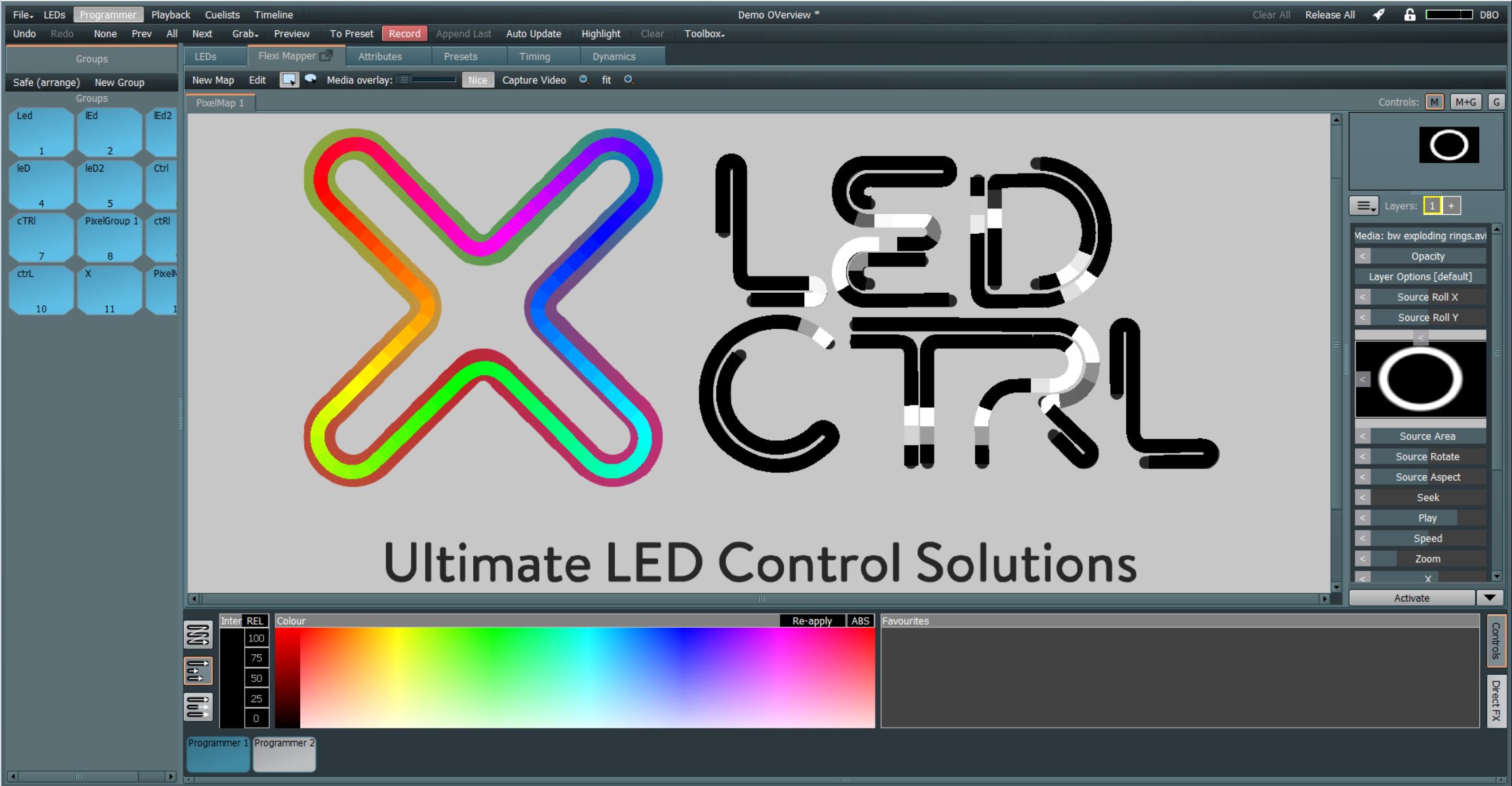
Create curved, complex or traditional pixel maps with ease.
Easily group and organise pixels together.
Select any pixel and control it directly without media.
You name it, we talk it: Art-Net, sACN, E1.31, DMX and more.
Pay for what you need, not for what you don’t.
Manipulate movie and image formats for quick, easy effects.
Easily arrange media over any pixel section.
Save your favourite colours for future reference.
Pre-built animation effects, ready to go.
Fan, select and animate straight from the colour picker.
Quickly adjust brightness on the fly.
Choose how selections arrange: continuous, split-variable or split-even.
Hover · Tap · Tab through the markers
Case Studies
From facades to festival art — real-world projects built on the LED CTRL real-time control engine.
Nearly 1,000 m of RGBW LED neon pixel strip as an architectural feature atop the iconic 1 O’Connell St building in Sydney, Australia.
A classy architectural installation brings the awning of UNO Apartments in Greenacre, Sydney to life using warm-white 36 mm pixel dots.
Nine dynamic rainbows and upgraded signage elements with LED RGB neon strip lighting for a short-term Easter installation.
Common questions about installing, configuring and using LED CTRL software — click any to expand.
PC, Mac and Linux. For installations we recommend the dedicated platform (such as the CX10), which comes pre-configured for a LED CTRL installation.
Art-Net and sACN over Ethernet are the native output formats. These are converted to the protocol the lights need by additional controllers — the PX24 (Art-Net to SPI / X-Stream) or the DX10 (Art-Net to DMX).
Not to program. DEMO mode covers concept work and programming with no licence. Driving live fixtures needs a USB licence key. Licences run from 10 to 256 universes (direct control) or 1024 universes (pixel mapping), and multiple keys combine for more capacity.
Run the Windows installer from ledctrl.com and accept the unknown-publisher prompt. Keep the default that also installs the Aladdin HASP SRM licensing software, set the destination folder and Start Menu location, then select Install. Takes about a minute.
Full walkthrough: Installation guide.
Mount the .dmg, then install two things in order. Run Sentinel Runtime.pkg first — that is the HASP driver for licensed operation. Then drag the LEDctrl icon to Applications. Double-clicking it launches the app instead of installing it.
Full walkthrough: Installation guide.
The MX96PRO/SX and PX24 controllers are tightly integrated with LED CTRL, providing drag-and-drop assignment of pixel groups, simplified single-point configuration, documentation and monitoring.
Set the master IP first, then match the controllers to it. Worked example: master 2.0.40.1, PX24 2.0.40.2, MX96 2.0.40.3, all on subnet 255.255.255.0. Pick the adapter under File → Settings → ArtNet Settings, “Default network interface”. New devices show as EXCLUDED — right-click to Enable and assign universes. Defaults are PX = 24, MX = 96.
Step by step: Hardware Patch.
Yes. Set Country and City in the Time/date Scheduler (File → Time/date scheduler) so it derives longitude and latitude, then trigger on Sunrise/Sunset or Solar noon with an offset up to ±23:59. Start of day gives an absolute time, and custom times import from CSV. Events run on chosen days of the week with a repeat interval and a maximum repeat count.
Import and export package as *.lcpack, with optional media and images. If auto backup is enabled (via Preferences), LED CTRL also takes periodic automatic backups — when loading, select Load Backup in the Open dialog to list them by timestamp.
Yes. The Media Controls pane in the Programmer’s Flexi Mapper tab lets you apply video, images, generated effects and NDI streaming input. Zoom, position, rotation, perspective, aspect, media speed, media start point and source area are all adjustable. Activation can apply the media across every pixel on the canvas, or across selected pixels only.
The canvas where you design, configure and visualise a project. Import a project image, lay fixtures over it, configure them, generate programming. One project can hold multiple Flexi Mappers to control separate zones, or for different creative effects.
Yes. “16 bit High resolution” in the Pixel Group properties dialog assigns two channels per colour component instead of one, giving 65,536 possible values. Set it at creation: pixel type (full control or pixel mapping only), channel order and high resolution cannot change afterwards. Note this consumes double your licence compared to 8-bit pixels. An alternative is a strip such as the X-Stream FXT10, letting the MX or PX controller upscale colour resolution from 8-bit to 16-bit.
LED CTRL includes a media generator for a range of media-mapped effects, as well as Direct FX — directly controlling pixels with auto-generated patterns without applying media. Direct FX covers Intensity Chase, Intensity Ripple and Intensity Wave for intensity, and Rainbow, RGB Chase, RGB Ripple, RGB Uber and Swirl for colour. Custom versions can be saved to the Direct FX panel.
LED CTRL Software Downloads
Talk to us
Get in touch to see how LED CTRL can transform your installation. We’ll walk you through the workflow on a live demo.
Questions? Email us at sales@ledctrl.com